生命游戏 康威生命游戏(英语:Conway’s Game of Life),又称康威生命棋,是英国数学家约翰·何顿·康威在1970年发明的细胞自动机。
生命游戏中,对于任意细胞,规则如下:
每个细胞有两种状态 - 存活 或死亡 ,每个细胞与以自身为中心的周围八格细胞产生互动。
当前细胞为存活状态时,当周围的存活细胞低于2个时(不包含2个), 该细胞变成死亡状态。(模拟生命数量稀少)
当前细胞为存活状态时,当周围有2个或3个存活细胞时, 该细胞保持原样。
当前细胞为存活状态时,当周围有3个以上的存活细胞时,该细胞变成死亡状态。(模拟生命数量过多)
当前细胞为死亡状态时,当周围有3个存活细胞时,该细胞变成存活状态。 (模拟繁殖)
可以把最初的细胞结构定义为种子,当所有在种子中的细胞同时 被以上规则处理后, 可以得到第一代细胞图。按规则继续处理当前的细胞图,可以得到下一代的细胞图,周而复始。
这篇文章将用 Python 实现这个游戏,作为 yield 的演示。
什么是 yield yield 是 Python 中一个语法关键字,在英文里,这个单词有“产生”和“让出”两个意思。在 Python 里,两个意思都有,作用是产出 一个值并让出 控制权,当一个函数内包含了 yield 语句,那么这个函数就是一个生成器函数 ,生成器函数类似于迭代器 ,可以作为 next 的参数,除此之外还有 send 方法,用来接收外部值。当函数执行到含有 yield 的语句的时候,就会将 yield 后面的值作为下一个迭代的值,并暂停 函数执行,直到外部调用 next 或者 send 才会继续执行。当函数执行完毕之后,就会抛出 StopIteration 异常;如果是通过 return 语句返回的,那么 StopIteration 里会有返回值。下面是一个例子:
1
2
3
4
5
6
7
8
9
10
11
12
13
14
15
>>> def gen(): ... a = 1 ... b = yield a ... c = yield b ... return c ... >>> it = gen() >>> print (next(it)) 1 >>> print (next(it)) None >>> print (it.send(42)) Traceback (most recent call last): File "<stdin>" , line 1, in <module> StopIteration: 42
如果函数没有 return 语句,表现是这样的:
1
2
3
4
5
6
7
8
9
10
11
>>> def gen(): ... a = 1 ... yield a ... >>> it = gen() >>> next(it) 1 >>> next(it) Traceback (most recent call last): File "<stdin>" , line 1, in <module> StopIteration
生成器嵌套之 yield from 当有多个生成器嵌套的时候,可以用 yield from 简化代码,这时候相当于在当前生成器函数和子生成器函数之间建立了一个通道,比如说:
1
2
3
4
def chain (*args ): for arg in args: for it in arg: yield it
可以写成:
1
2
3
def chain (*args ): for arg in args: yield from arg
理解了这两个关键字的作用之后,就可以开始写生命游戏了。
生命游戏 用 yield 和 yield from 编写这个游戏的基本思路就是通过这两个语句不断产生基本事件,并在一个驱动循环中处理事件。这对于以后编写并发程序是一个比较基础的认识。
假设我们用这两个符号代表不同的状态:
定义事件 首先,定义几种基本的事件:Query 表示查询某个格子的状态,Transition 表示某个格子状态的转换,Tick 表示一代过去了。
1 2 3 Query = namedtuple("Query" , ("r" , "c" )) Transition = namedtuple("Transition" , ("r" , "c" , "next_state" )) Tick = namedtuple("Tick" , "step" )
定义步骤 在每一代中,我们需要对每一个细胞做下面的操作:
查询自己的状态(生成一个 Query)
查询邻居的状态(子生成器生成 Query)
计算新的状态
生成一个 Transition 事件用于转换状态
1 2 3 4 5 def step_cell (r, c ): state = yield Query(r, c) alive_neighbours = yield from count_alive_neighbours(r, c) next_state = game_logic(state, alive_neighbours) yield Transition(r, c, next_state)
查询邻居的状态是一个子生成器:
1 2 3 4 5 6 7 8 9 10 Neighbour = namedtuple("Neighbour" , ("dr" , "dc" )) neighbours = [Neighbour(dr, dc) for dr in range (-1 , 2 ) for dc in range (-1 , 2 ) if dr or dc] def count_alive_neighbours (r, c ): neighbour_states = [] for neighbour in neighbours: state = yield Query(r + neighbour.dr, c + neighbour.dc) neighbour_states.append(state) return Counter(neighbour_states)[ALIVE]
注意这里不能用列表推导的方式:
1 2 neighbour_states = [yield Query(r + neighbour.dr, c + neighbour.dc) for neighbour in neighbours]
这样是语法错误,是不允许的。
而游戏的逻辑则根据规则简单地写一个函数:
1 2 3 4 5 6 7 8 9 10 def game_logic (state, alive_neighbours ): if state == ALIVE: if alive_neighbours < 2 : return DEATH elif alive_neighbours > 3 : return DEATH else : if alive_neighbours == 3 : return ALIVE return state
编写驱动循环 我们通过一个 GridWorld 来存放世界的状态,并通过一个循环来驱动各个生成器:
1 2 3 4 5 6 7 8 9 10 11 12 13 14 15 16 17 18 19 20 21 22 23 24 25 26 27 28 29 30 31 32 33 34 35 36 37 38 39 40 41 42 43 44 45 46 47 48 49 50 class GridWorld (object ): def __init__ (self, width, height ): self .width = width self .height = height self .grids = [] for _ in range (height): self .grids.append([DEATH] * width) def query (self, r, c ): return self .grids[r % self .height][c % self .width] def transition (self, r, c, next_state ): self .grids[r % self .height][c % self .width] = next_state def event_loop (self ): step = 0 while True : for r in range (self .height): for c in range (self .width): yield from step_cell(r, c) yield Tick(step) step += 1 def simulate (self, steps=10 ): step = 0 event_loop = self .event_loop() event = next (event_loop) next_generation = GridWorld(self .width, self .height) while step < steps: if isinstance (event, Tick): step = event.step self .grids = next_generation.grids next_generation = GridWorld(self .width, self .height) print ("Step: {step}/{steps}" .format (step=step, steps=steps)) print (self ) event = next (event_loop) elif isinstance (event, Query): event = event_loop.send(self .query(*event)) elif isinstance (event, Transition): next_generation.transition(*event) event = next (event_loop) def __str__ (self ): return '\n' .join(['' .join(row) for row in self .grids])
然后,只需实例化 GridWorld,并执行 simulate 方法,就能看到程序输出的仿真结果了。完整代码请参考:https://github.com/howardlau1999/learning-python/blob/master/gameoflife.py
总结 yield 和 yield from 非常适用于离散事件仿真。在使用生成器的时候,要记得先预激活生成器,否则不能进行 send 操作。

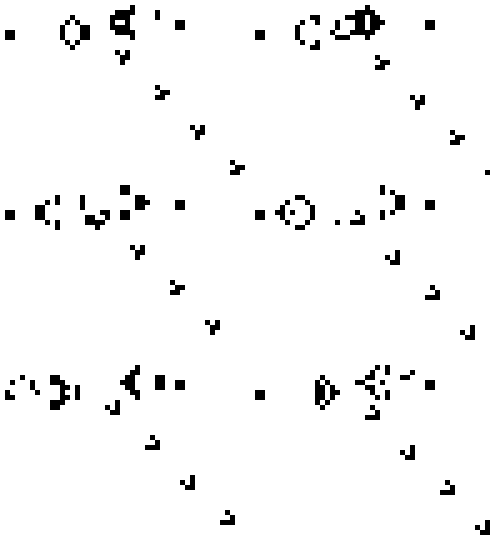 生命游戏
生命游戏